
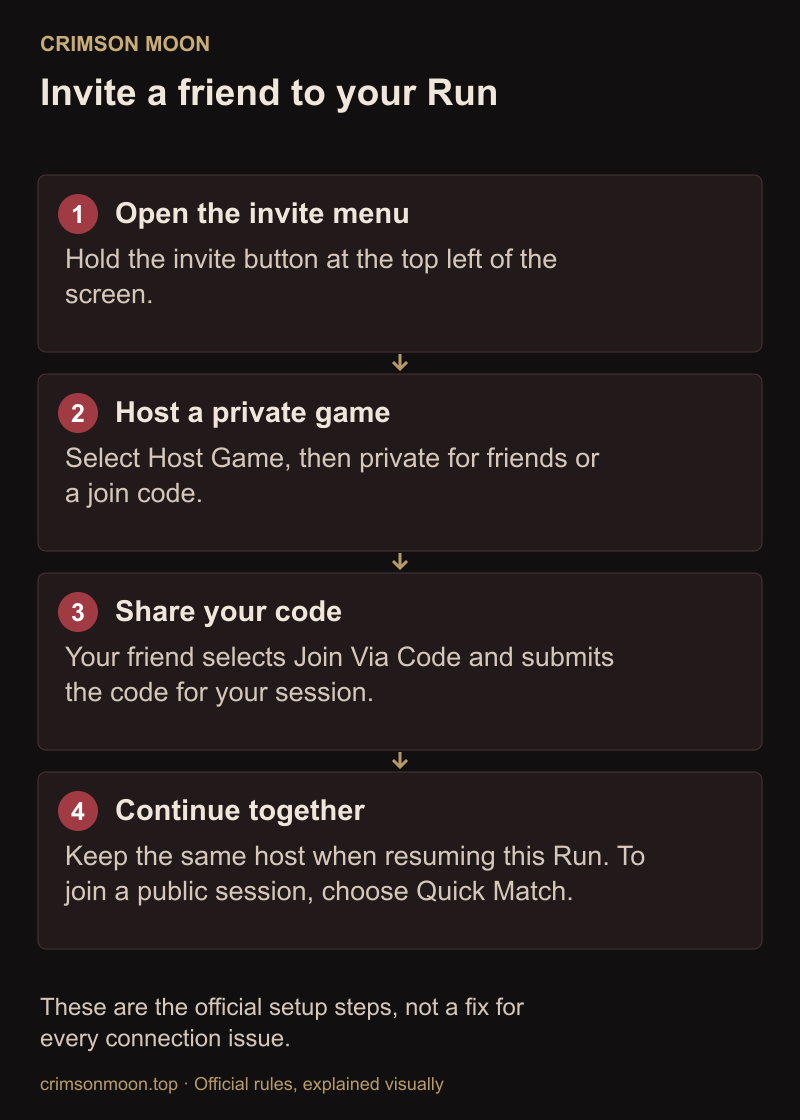
To play with a friend, hold the invite button at the top left, select Host Game, and choose a private session. Invite your friend from the smiley-face friends list or send them the session code. Use Quick Match if you want a public session.
Follow the four hosting and joining paths. The host owns the Run, so keep the same host when resuming later. The progress section explains what to check after a boss or disconnect.
Hotfix 1.0.1 changed guest continuation and fixed several invitation and synchronization issues. See the current patch status before relying on launch-day reports.
How to Start Co-op
Start at the portal in Sanctus Clypeus. Open the co-op menu by holding the invite button shown at the top left of the screen. The following paths come from the official co-op instructions.
Host a public or private game
- Select Host Game.
- Choose private for friends or code-only access, or public for matchmaking.
- Share the session code with the player you want to join.
Invite a platform friend
- Host a private session.
- Open the friends list using the smiley-face icon.
- Choose an online friend who owns Crimson Moon, then select invite.
Join through Quick Match
- Open the invite menu and choose Quick Match.
- Wait for matchmaking to connect you to an active public session.
Join with a code
- Open the invite menu and select Join Via Code.
- Enter the host's session code and choose submit.
Before a fresh Run, both players should prepare their starting equipment. Mid-Run joining is supported, but the arriving player starts with starter equipment. Invitation failures remain a separate known issue; see troubleshooting if the menu flow does not complete.
Crossplay and Platforms
The developers confirm full cross-platform play across supported platforms. Quick Match and Join Codes are also official launch features.
The official material does not explain crossplay toggles, platform account requirements, region selection, host migration, or whether a Join Code bypasses a disabled crossplay setting.
What Should Happen Between Missions
Developer AMA 2 says both players return to the same Sanctus Clypeus lobby, remain in the party, use hub progression services, and continue the Run. A completed District restores the Life Pool before the next Mission.
The September 2 developer clarification confirms that the Loadout Station stays locked between Missions in an active Run. Players can still use available vendors, permanent upgrades, and field gear, but must prepare their starting Loadout before the Run.
The Loadout lock is intended behavior. Disconnects and failed invitations are separate problems; neither changes the official rule that a party can continue the same Run from the shared hub.
See the save and resume rules before changing hosts or ending a session.
What Is Shared and What Is Separate
| System | Observed behavior | Evidence level |
|---|---|---|
| Life Pool | Deaths draw from a shared pool, and partners can revive each other. | Officially confirmed |
| Difficulty scaling | Bosses and encounters adjust for the second player's damage and utility. | Officially confirmed |
| Equipment drops | A pre-launch two-player review found that Gear was not instanced. The pair had to decide who would Equip or Store a drop. | Single pre-launch field test |
| Gold drops | One live duo test showed separate Gold totals and no automatic sharing. | Single field test |
| Nexus Gate choices | The same duo saw identical Boon choices at one Gate. | Single field test, not a universal rule |
| Lore Scrolls | Each player appeared to need a separate interaction. The guest repeatedly could not collect some Scrolls. | Developer-confirmed bug; 1.0.2 fix planned |
| NPC dialogue | A pre-launch review reports that only the player who started an NPC conversation heard the full dialogue. | Single pre-launch field test |
The official support material does not define Gear ownership, Gold ownership, all Scroll-credit cases, or every guest reward. Treat the field tests as warnings for planning a session, not permanent rules for every platform and patch.
Guest Scroll pickup has since been confirmed as a bug by the developer; it is not intended host-only ownership.
Host, guest and continuing later
For a shared co-op session, the official Run guide assigns the route to the host. Keep the same host when resuming together. Since Hotfix 1.0.1, the guest can also retain Run progress and continue solo. That change does not establish that every quest reward, Scroll or dropped item is credited to both accounts.
After a disconnect, first check whether the guest can continue alone. Compare character level, Mission, Stone progress, purified Gear and quest rewards on both accounts before starting a new Run. Missing permanent progress belongs in the save-loss checklist.
Co-op fixes and open issues
| Symptom | Current evidence |
|---|---|
| Guest stuck at title screen after an invite | A fix is listed in 1.0.1; report a recurrence with both platforms and versions. |
| Unable to host after reconnecting | A fix is listed in 1.0.1. |
| Guest cannot collect Lore Scrolls | Developer-confirmed; targeted for the upcoming 1.0.2. |
| Quest or equipment progress differs between accounts | Further co-op/progression fixes are planned. Do not assume a shared completion screen confirms both rewards. |
| Disconnects or crashes | Some fixes shipped in 1.0.1; further work is announced for 1.0.2. |
Checked September 30 against the published patch record. The launch support notice is useful history, not the current list of unfixed problems.
Launch footage: historical reports
These observations describe launch footage, not a fresh test of 1.0.1. Scroll pickup is now confirmed separately in the current issue table.
- A cross-region United States and Portugal session showed severe input delay, delayed hit registration, and frame drops for the guest.
- The guest's Angelic Grace meter appeared not to gain charge for most of one Mission.
- Several Lore Scrolls and one interaction could not be used by the guest.
- A guest was removed at the moment a World Boss died.
- Weapon Arts sometimes passed through enemies or dealt no damage, including during the co-op boss fight.
Each item comes from one live session. Region, host platform, review access, connection quality, and patch state may have contributed. The reports are useful reproduction leads, not a promise that every co-op session behaves this way.
If your co-op session fails
- Compare the installed version on both devices and read the current issue table above.
- Note the host, join method, Mission and last action before the problem.
- After a disconnect, check the guest solo-continuation option before abandoning the Run.
- Check both characters for missing permanent progress or rewards.
- Send a reproducible report through official support, with both platforms, versions and screenshots.
A workaround reported for one device is not a universal fix. Avoid replacing saves to solve an invitation or Scroll-pickup problem.
Co-op Build Tips
There are no formal team-up moves. Gear, Weapon Arts, Boons, and status effects provide the main interactions. The developers describe one player applying Mark or another status while the partner equips effects that benefit from it.
- Agree on who applies the status and who triggers its payoff before deployment.
- Split damage, control, and survival duties instead of duplicating a narrow role.
- Save at least one Angel transformation for a dangerous elite pack or boss phase.
- Remember that shared lives make simultaneous deaths much more expensive.
- Discuss Equipment drops before either player Stores or Equips the item.
The status glossary explains what Marked, Rage and Sunderance actually do; shared stack behavior across both players still needs verification.
Solo content and co-op achievements
The developers describe story content, enemies, levels and collection goals as available solo. The Steam achievement Slay Together is an exception for completion hunters: it requires finishing a Mission in co-op. See the achievement goals before planning an entirely solo completion.
Frequently Asked Questions
How many players does Crimson Moon support?
Up to two players in online co-op.
Does Crimson Moon have crossplay?
Yes. Full cross-platform play is officially confirmed for supported platforms.
Is matchmaking available?
Yes. Quick Match and direct Join Codes are confirmed.
Can a friend join in the middle of a Run?
Yes. The official Run guide supports mid-Run joining, with starter equipment for the arriving player. Reported invitation and connection problems can still prevent a successful join.
Are Gear and Gold shared?
A pre-launch duo found Equipment was a single non-instanced drop, while one live session showed separate Gold totals. Neither behavior is documented by official Support.
Is guest progress safe after a disconnect?
Hotfix 1.0.1 lets guests retain Run progress for solo continuation, but this does not guarantee every reward or prevent every save problem. Check both accounts after a disconnect.
Can I change my full Loadout between Missions?
No. The September 2 developer clarification confirms that the Loadout Station stays locked until the active Run ends.
Can I complete everything solo?
Game content is designed to be accessible solo, but the Steam achievement Slay Together requires a completed co-op Mission.
Sources and Evidence
Official sources explain the rules. Third-party gameplay reports are identified by author and describe the version or session shown; they are not our own tests.
- Crimson Moon official website
- Crimson Moon on Steam
- Crimson Moon on PlayStation 5
- Crimson Moon on Xbox Series X|S
- Crimson Moon Support: Launch-Day Known Issues
- Crimson Moon Support: Sanctus Clypeus
- Official Beginner's Guide to Crimson Moon
- Official How Builds Work video
- Crimson Moon Developer AMA 2
- Crimson Moon Developer AMA 4
- The Co-Op Bros two-player review and field test
- DarkHero 25-hour review and field test
- FightinCowboy and Rurikhan co-op field test
- Official Crimson Moon Wiki: How Runs Work
- Official clarification: Runs, Loadouts and Gear (September 2)
- Official PC patch 1.0.0.1: keyboard and mouse controls (September 3)
- Crimson Moon Support: How to Host or Join Co-op
- Official Hotfix 1.0.1 notes (September 11)
- Developer update on Hotfix 1.0.2 (September 24)
- Steam: developer confirmation of guest Scroll pickup bug
- Steam: Crimson Moon achievement requirements